For every MetaTrader 5 trader · manual or automated · iPhone & Apple Watch
Every account, every trade, one screen. Statement-grade reports. News blackouts that actually pause trading. An optional copier as fast as your ping. All on a server you own.
Free to start · Any MT5 broker, any symbol · Self-hosted, no data leaves your server

Monitoring
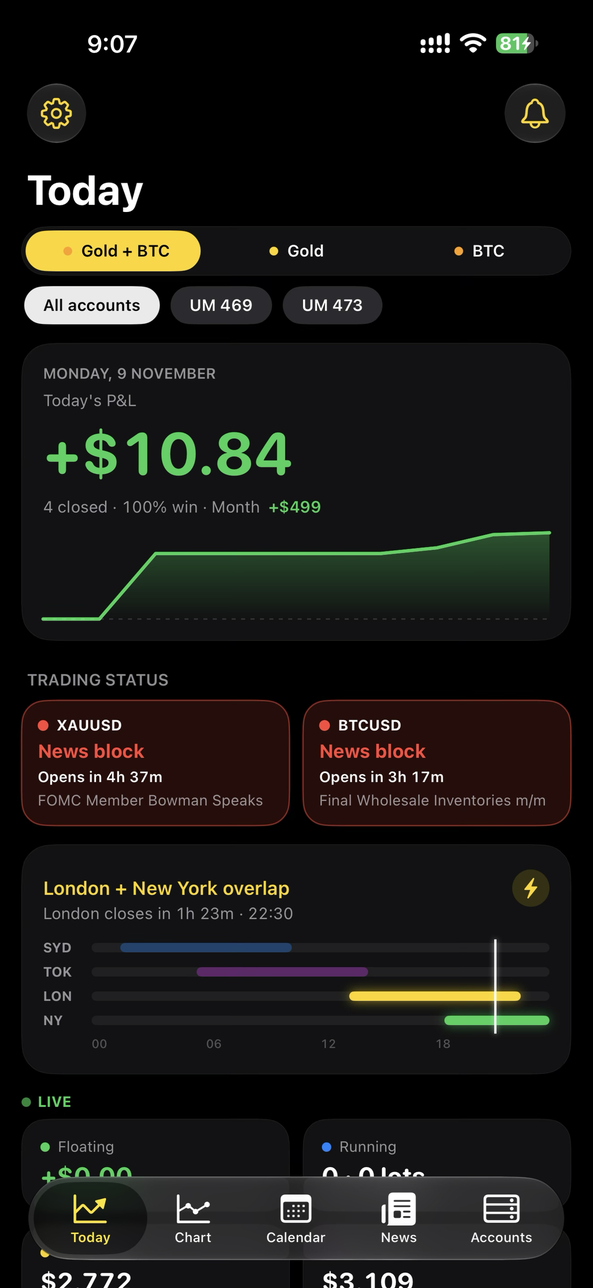
Daily, monthly and yearly P&L for all accounts combined or any single account, one tap to switch. Win rate, best and worst day, streaks, with deposits and withdrawals kept separate from trading results.
Floating P&L, open lots, equity and margin refresh every second from your own sync EA. Flash red when floating drops below your line.
Sydney, Tokyo, London, New York on one bar with the overlap highlighted. Your broker's hours, daily break and holidays, in your time zone.
Any symbol your broker offers — forex, metals, indices, crypto — from your broker's own feed, M1 to W1, with news events plotted on the chart. Prices that match your fills.
Trade opened or closed, price crossed, floating below a limit, news block starting, EA or server offline — pushed to your phone with the app closed. Grouped, so twelve fills are one notification.
Choose the master, add slaves, generate a unique key and setup code per account. Live status per slave: online/offline, last copy, latency, slippage, copies open. Health compares each slave's results with the master's. Pause or resume any slave with one tap.
Pause one EA, pause an account, or close everything and delete pending orders — from your phone. Protected by Face ID and a typed confirmation.
Compare accounts or strategies side by side. Tag magic numbers, A/B setups, spread and slippage stats, risk flags, hour-of-day and news-impact analysis, what-if windows.
Trading statement as PDF for any date range and account set: every trade with ticket, side, lots, symbol, open/close, duration, commission, swap and net; totals, win rate, drawdown and deposits/withdrawals. Withdrawal-readiness check flags held-over-news and min-duration trades. CSV export, calendar export, encrypted backups.
What you get
Free covers one account with the core views, plus the copier controls if you own HorvoCopy. Pro unlocks everything below for unlimited accounts. HorvoCopy EA is sold separately and optional.
HorvoCopy · Expert Advisor
Copy between your own MT5 accounts, any broker to any broker, any symbol. No third-party service in the path. Sold separately; the Horvo app works fully without it.
Requires your own Horvo server and hedging accounts on the slave side. Monitoring in the app does not require HorvoCopy.
*Terminals in Europe, server in the US. Same data centre: tens of ms. Shown live in the app.
News auto-block
Per-symbol windows around high-impact events for any pair your broker supports. Horvo pauses the accounts you choose before the release and, in hard mode, closes any entry that slips through. Trading resumes automatically.
Everywhere you look
Full app on iPhone and iPad. Today's P&L and floating on the Home Screen, a Live Activity on the Lock Screen while trades run, news status included.
P&L, floating and news status as a complication. Glance at your wrist during London open.
Horvo is self-hosted. Trade history, keys and copier traffic stay on a server you control, with built-in backups and health monitoring. We never host your data.
Pricing
| Feature | Free | Pro |
|---|---|---|
| Fully monitored accounts | 1 | Unlimited |
| Today, P&L calendar, live floating | ✓ | ✓ |
| Session clock and broker hours | ✓ | ✓ |
| News calendar and countdown per pair | ✓ | ✓ |
| Trading statement PDF, CSV export | ✓ | ✓ |
| Home Screen widgets | ✓ | ✓ |
| Copier setup, keys, status and pause (with HorvoCopy) | ✓ | ✓ |
| All accounts combined, year view, activity feed | — | ✓ |
| Live broker charts, any symbol | — | ✓ |
| News auto-block and hard block | — | ✓ |
| Push alerts | — | ✓ |
| Pause EA, pause account, kill switch | — | ✓ |
| Compare, strategy tags, risk and news-impact analysis | — | ✓ |
| Withdrawal-readiness check | — | ✓ |
| Lock Screen Live Activity and Apple Watch | — | ✓ |
Subscriptions are billed through the App Store; cancel anytime. HorvoCopy EA is a separate purchase on MQL5 Market; its setup and controls in the app are free, with or without Pro.
FAQ
Yes — any MetaTrader 5 broker, any account type. A small sync Expert Advisor runs in your own terminal and the app shows your accounts from there. Hedging accounts are required for the copier's slave side.
On a server you control. Account numbers, trade history and keys never pass through Horvo's systems, and Horvo never asks for your broker password.
As fast as your network. The delay is essentially the ping between your terminals and your server — tens of milliseconds when they share a data centre, a few hundred when they don't. Partial closes and SL/TP changes are mirrored the same way, and the app shows the measured latency for every copy.
Yes. News auto-block pauses selected accounts before high-impact events and, in hard mode, closes any entry opened inside the blackout. Windows and impact levels are set per symbol.
MetaTrader 5 on each terminal, your own Horvo server, the EA activated from MQL5 Market, and hedging-mode accounts on the slave side. The Horvo app is optional for copying and required only for monitoring and remote control.
Yes — any MT5 broker to any MT5 broker, in any country. Horvo copies through your own server, so it does not depend on broker partnerships or an approved-broker list. Symbol names that differ between brokers are handled by the symbol map.
Only wherever your EAs already run. The sync and copier EAs run next to them. Your phone can be off; alerts still arrive.
No. Horvo is a monitoring and automation tool for your own accounts. It doesn't provide signals, manage money or give advice.
Horvo is free to download. Pro unlocks the copier, news auto-block and alerts, with a 7-day trial.